

ERP for Zimbabwe.
Built around your day.
Sell through connection drops. Fiscalise with ZIMRA-certified FDMS. Work in USD and ZWG. Bring your stock, accounts and Zimbabwe payroll into one connected system.
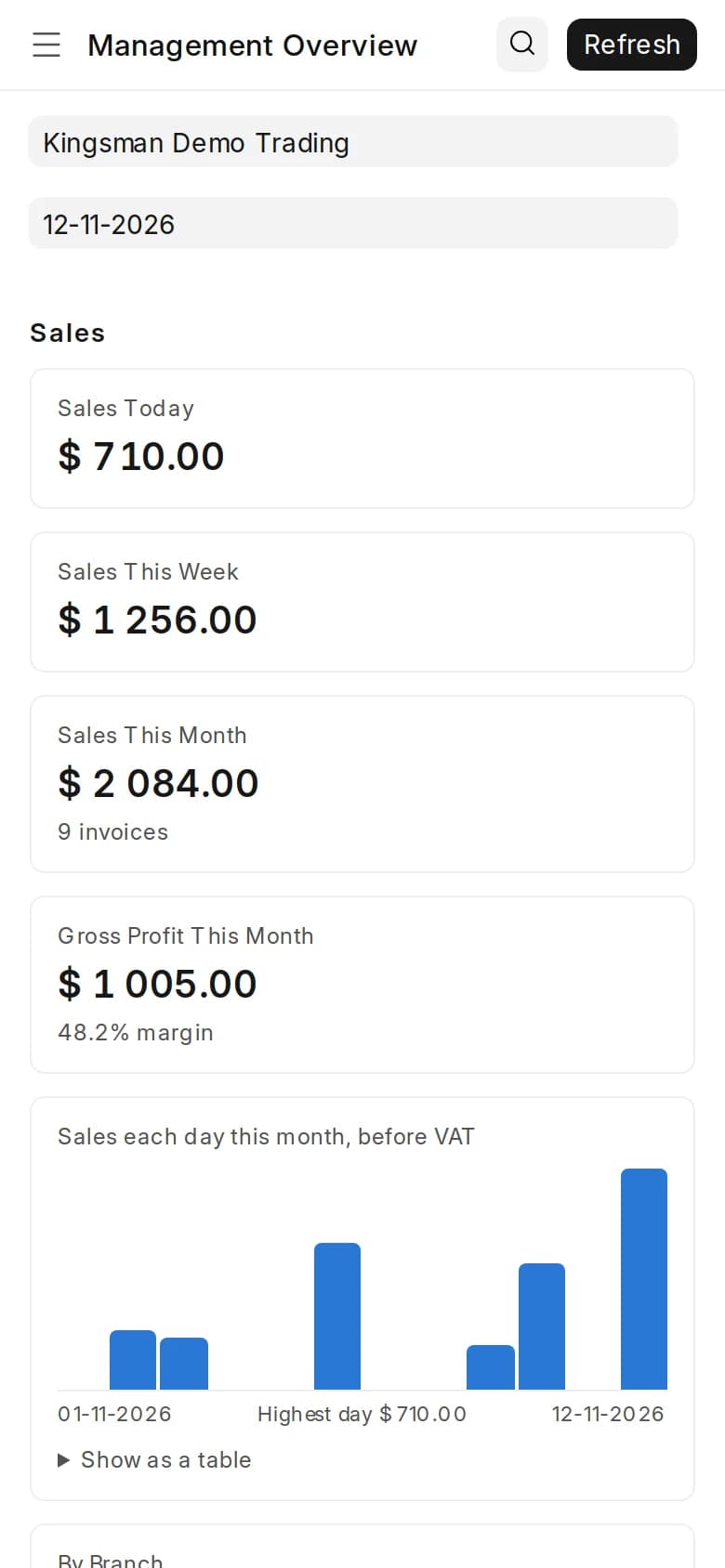
And in your hand.
ZIMRA FDMS certifiedUSD & ZWGOffline-capable POSZimbabwe payrollMulti-branch operations
Find your fit.
Start with the work you do. Explore where CrownCore’s connected workflows fit best.
Select your sector to see how CrownCore fits.
Keep the shop floor and the books together.
For shops, hardware merchants and businesses selling over the counter or on account. Connect the till to customer pricing, stock and the day’s closing.
- Offline-capable tills & barcode selling
- Retail and wholesale customer pricing
- Branch stock, refunds & shift reconciliation
Product search, customer selection and payment currency share the same till workspace.
The modules behind your working day.
Start with a workflow. Inspect the real screen, then explore how it connects to the rest of your business.
Select a module to explore its features and screen.
Know where your business stands.
Follow the money from the first transaction to the financial statements. Bring receivables, payables, cash and bank activity into the same picture.
- Multicurrency accounts and exchange differences
- Customer collections and supplier obligations
- General ledger, balance sheet and cash flow
Asset groups, receivables and bank balances in the balance sheet. Open the full report for its filters and totals.
ALSO CONNECTEDPortals, assets & business controls
Choose a workspace to see it in action.
A place for customer documents.
Give customers a portal for the records shared with them, including their invoices.
Real screens, in motion.
Ten short videos of the real system with demo data, narrated, with captions and transcripts. Start with the full tour, or pick one workflow.
Read the transcript
- 0:00 This is CrownCore ERP. Real screens, with demo data.
- 0:06 A cashier rings up three items, takes cash, and the change is worked out.
- 0:13 The sale is saved, ready for its fiscal receipt.
- 0:22 Moments later, it's in the management overview. Today's sales, the month's margin, top customers, and stock, all from the same records.
- 0:35 When the internet drops.
- 0:37 The till is online.
- 0:40 The connection drops. The till says so, and keeps selling.
- 0:45 A sale is rung up, and paid as usual,
- 0:50 then saved on the till, and queued.
- 0:53 When the connection returns, the sale is sent, and checked on the server. Nothing is lost.
- 1:02 Stock, and imports.
- 1:05 Stock by location. What each branch holds, what's promised, and what's free to sell.
- 1:11 And what's still on its way, stage by stage.
- 1:16 Each import shipment carries its supplier, route, and clearing point, with its dates worked out from the route.
- 1:27 Getting paid.
- 1:30 Who owes you, how late, and against which credit limit.
- 1:35 Then, just the overdue.
- 1:38 Approvals.
- 1:41 Purchase orders over your limit wait for the right person.
- 1:47 Everyone can see who raised them, and who they're waiting for.
- 1:53 Payroll.
- 1:56 A month's payroll, in US dollars and ZiG, with the exchange rate it used, and the totals in both.
- 2:04 And who ran it, and when.
- 2:10 Assets, and projects.
- 2:12 A company vehicle on the asset register, with its depreciation scheduled, month by month.
- 2:24 Every project's tasks, on one timeline, from the first survey to handover.
- 2:33 To see it with your own workflow, WhatsApp or call Kingsman Software Services.
Zimbabwe, in the details.
Currency, payroll, tax preparation and trade. The details that make an ERP relevant to your working day.
Select a topic to explore the local features.
Two currencies. One view of the business.
Work in USD and ZWG with currency-specific balances and recorded exchange differences. Bring local tax preparation into your accounting workflow.
VAT working papers
Build period returns by currency, with input-VAT evidence checks and a working-file export. Figures are entered into TaRMS separately.
ITF263 & withholding
Track supplier clearance numbers and expiry dates, with configurable withholding and a supporting schedule.
IMTT & provisional tax
Configure IMTT posting and use QPD schedules to track estimated provisional-tax instalments.
Tax settings and applicable rates are reviewed with your accountant during implementation.
Period-based VAT records support review and working-file preparation.
Built for how Zimbabwe works.
What a business here needs from day one, and how it is usually met. General comparisons, not reviews of any one product.
| Need | CrownCore ERP | A general international ERP | Spreadsheets and a standalone till |
|---|---|---|---|
| USD and ZWG together | Both in one set of books, with exchange differences recorded | Multicurrency, configured by your partner | Separate files or columns, reconciled by hand |
| ZIMRA FDMS fiscalisation | Certified, inside the system | Usually a separate add-on or device integration | A separate fiscal device, matched by hand |
| PAYE, NSSA, NEC & ZIMDEF | Built in, with statutory sign-off before payroll runs | Usually localised by a partner | Separate payroll software or spreadsheets |
| Selling when the connection drops | The till keeps selling and checks each sale when it reconnects | Depends on the product | Paper, or the till's own records |
| Labour Act leave | Sick and maternity leave as the Act sets out | Configured during implementation | Tracked by hand |
| Support | Kingsman Software Services, in Harare | Depends on the partner | Whoever set it up |
The connection drops.
The till keeps working.
Capture sales with the products, customers, prices and exchange rates already available on the till. Queue the work locally and check it on the server when the connection returns.
Offline selling, with clear limits. Mobile money, new sign-ins and supervisor approvals need a connection. Stock is checked when sales sync.
Receipts follow the fiscal workflow. An offline sale slip is not a fiscal receipt. Sales are fiscalised through ZIMRA FDMS once the till reconnects and syncs.
Choose where CrownCore runs.
Choose infrastructure around your locations, connectivity and IT team. Agree the operating responsibilities before go-live.
Compare your deployment options.
On premises. Under your control.
Deploy CrownCore on a server your organisation operates. A fit for teams with their own infrastructure and IT support.
- Your server and chosen network access
- Backup destination and recovery plan agreed
- Updates rehearsed before production changes
See how missing setup is flagged
The supplied demo has outstanding setup items. Go-Live Readiness highlights what the implementation team must resolve before launch; this capture is not a production-ready installation.
Go-live checks identify setup items that still need attention.
Core ERP workspaces need a connection to the server. Offline capability applies to supported till workflows. Hosting, support, backups and service levels are scoped for your implementation.
Pay once for the package. It's yours to keep.
All prices are in USD. The package and setup are paid once. Support is monthly, and optional on your own server. There are no per-user licence fees.
Shop
One shop or office: the till, fiscalisation, stock and accounts.
$500once, yours to keep
- Setup and training
- $200 once
- Support (optional)
- $25 a month
- Hosting, if we host it
- $20 a month
- Till, ZIMRA fiscalisation, stock and accounts
- Companies: 1
- Branches: 1
- Tills: 3
- Users: 8
Business
Up to four locations, with imports, payroll and CRM.
$1,800once, yours to keep
- Setup and training
- $600 once
- Support (optional)
- $60 a month
- Hosting, if we host it
- $45 a month
- Till, ZIMRA fiscalisation, stock and accounts
- HR and payroll
- CRM
- Imports and landed cost
- Companies: 1 + add-on
- Branches: 4
- Tills: 10
- Users: 20
- People on payroll: 100
Enterprise
Groups and larger businesses: several companies and branches, everything included.
from $5,000once, yours to keep
- Setup and training
- Quoted for your project
- Support (optional)
- from $180 a month
- Hosting, if we host it
- from $120 a month
- Till, ZIMRA fiscalisation, stock and accounts
- HR and payroll
- CRM
- Imports and landed cost
- Projects and assets
- Companies: 5
- Branches: 15
- Tills: 40
- Users: 75
- People on payroll: 400
Add a till, a branch or a part such as payroll at any time, each for a once-off price. See every price and what each package includes.
Built and supported by Kingsman Software Services.
Kingsman Software Services exists to make technology easier to trust.
Our work starts with understanding the business problem, not just the requested feature.
Kingsman implements and supports ERP for organisations in Zimbabwe. CrownCore is its own product, built on Frappe and ERPNext, for the way businesses here work.
- Commercial clarity
- Delivery visibility
- Long-term maintainability
“Working with Kingsman Software Services has been an outstanding experience. … We confidently recommend Kingsman Software Services to any organization looking for a dependable technology partner.”
- Office
- Lobengula Road, Harare, Zimbabwe
- Hours
- Monday to Friday, 9:00 AM to 5:30 PM
- Phone
- +263 717 751 701
- Juvakel Team Recruiters
- Pharmatrial Medicals
- Daredzidzo
- HuyAfrica Technologies
- Sundawn Solutions
- Sunharvest Solar Technologies
- Fundani Technologies
- Zuez Training Services
Before you decide.
Which parts of the business does CrownCore cover?
CrownCore brings together finance, sales and CRM, purchasing, inventory, point of sale, HR and payroll. Projects, tasks, expense claims, assets and customer and supplier portals are also part of the system. Your walkthrough can focus on the workflows your team actually needs.
Can we work across branches and currencies?
Yes. CrownCore supports branch-level access, stock transfers and sales reporting. Accounting supports multiple currencies, while the till can accept configured payment currencies and records the exchange rates used.
What happens when a till loses its connection?
The till can capture sales offline using locally available products, customers, prices and exchange rates. Sales are checked again when they sync. Some actions, including obtaining a new supervisor approval, still need a connection.
Does CrownCore support Zimbabwe payroll and fiscalisation?
Yes. CrownCore includes Zimbabwe payroll workflows with configurable statutory rates and review controls, and its ZIMRA FDMS fiscalisation integration is certified. During implementation we register your fiscal devices with ZIMRA and confirm your payroll settings with you before go-live.
What is CrownCore built on?
CrownCore is built on Frappe and ERPNext, the open-source ERP platform, with Zimbabwe-specific modules from Kingsman Software Services: payroll, ZIMRA fiscalisation, the offline till, local tax and the cash book. Each update is rehearsed on a copy of a site on the previous release before it reaches yours, and your data stays in your own database.
What does getting started involve?
Implementation begins with your company, branches, currencies, roles and opening data. CrownCore includes Business Setup, data import and Go-Live Readiness tools to help the implementation team review the setup with you. Hosting, migration and support arrangements are agreed for your organisation.
Is CrownCore's fiscalisation certified by ZIMRA?
Yes. CrownCore ERP is certified by ZIMRA for FDMS and connects directly, so every till sale and invoice is fiscalised from the same records that update stock and the books. Each business registers its own fiscal devices with ZIMRA and tries them in ZIMRA's test environment before going live; we do that with you.
Can we pay staff in USD and ZWG?
Yes. Pay in both currencies is taxed the way ZIMRA sets out: the whole salary once on the USD tables, with PAYE, the AIDS levy and NSSA shared between the currencies. The choices the law leaves to you are set once, signed off, and recorded, and PAYE, NSSA, NEC and ZIMDEF returns come from each run.
Where does CrownCore run?
On a server you own, or in a private cloud Kingsman runs for you. Either way it uses HTTPS, has encrypted backups that are restored in a monthly drill, and its till keeps selling when the internet drops.
How much does CrownCore cost?
You pay for a package once and keep it: Shop $500, Business $1,800, Enterprise from $5,000, in USD. Setup and training is $200 for Shop and $600 for Business, and quoted for Enterprise. Support is a monthly plan, optional on your own server: $25, $60 and from $180 a month. It covers updates, fixes, and ZIMRA, PAYE and NSSA changes. If Kingsman hosts CrownCore for you, hosting is $20, $45 or from $120 a month. There are no per-user licence fees. You can try everything free for 30 days first. See the pricing page for add-ons and what each package includes.
Can we move from QuickBooks, Sage/Pastel or spreadsheets?
Yes. Customers, suppliers, products, prices, opening stock and balances come across through an import page that checks every line before anything changes. We agree opening figures with your old system to the cent, and run payroll side by side for at least two months before anyone is paid from CrownCore.
Which industries does CrownCore serve?
Retail and wholesale, importers and distributors, services and projects, NGOs, hardware and industrial supplies, pharmacies and medical suppliers, agro-dealers, mining and mining suppliers, and construction. For other businesses it still runs the books, stock and payroll.
See CrownCore at work.
Bring a workflow, a reporting need or a question about your current system. Start there.